Seamless Cloud Ecosystem Orchestration & Enterprise Integration.
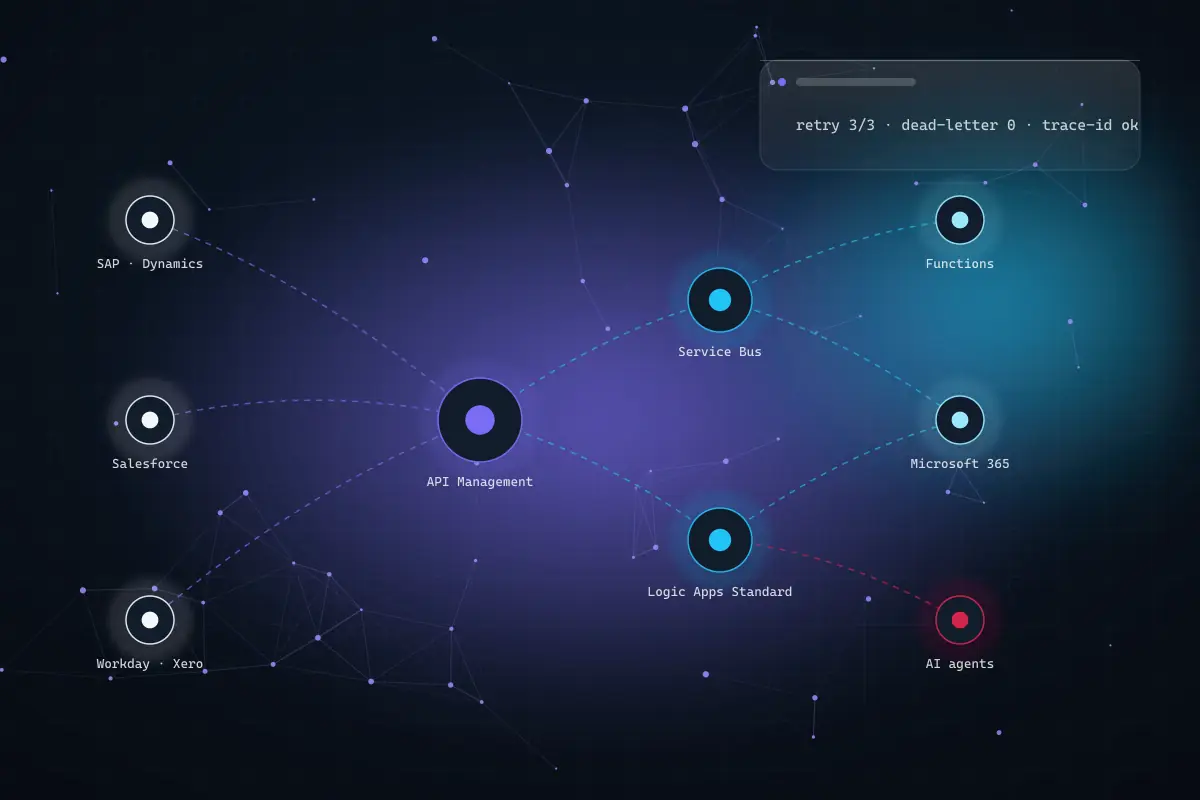
Logic Apps, API Management, Service Bus, Event Grid and Functions designed with retries, idempotency and end-to-end tracing, so a failure recovers on its own instead of quietly corrupting the numbers. The same governed layer migrates BizTalk and iPaaS estates one interface at a time and gives your AI agents controlled endpoints to act through.
- 13Integration service linesintegration map to managed support
- 12–16 wksTypical mid-market migration15–40 interfaces, parallel-run
- 2028BizTalk 2020 mainstream support ends11 April 2028 · extended April 2030
- 24/7Follow-the-sun on-callthree regions, someone is awake
You probably need this if —
- Someone re-types the same data into two systems
- An overnight job failed and nobody was told
- “Don’t touch that server, it runs the interfaces”
- Your BizTalk expert left in 2019
- Month-end reconciliation is a manual hunt
- Your iPaaS renewal costs more than the work












Every integration fails. Ours fails loudly, then recovers.
The difference between a five-year integration and one nobody will touch is entirely in the unhappy path. Hover the reference topology to see each service’s role, then take a system offline in the simulation and watch retry, dead-letter, alert and replay do their jobs.
Interactive topology: simulate an outage
Take any source or target system offline. Messages retry with back-off, park on the bus, dead-letter with a paged alert — and when you restore the system, the rehearsed replay drains the queue without double-posting.
simulate an outage
event log
- topology live · correlation ids on · idempotency keys on
Every integration service, under one engagement.
Take the whole programme or a single interface. Each capability is delivered by engineers who have also had to support it in production.
- 01
Enterprise API Management
An API gateway that is actually governed: products and subscriptions, versioning and revisions, rate limiting, request validation, a developer portal your own teams will use, and OAuth 2.0 rather than a shared key in a config file.
- Azure API Management gateway rollout and policy design
- Versioning, throttling and schema validation per product
- OAuth 2.0 with Entra ID · developer portal
- 02
Event-Driven Architectures
Service Bus queues and topics where order and delivery guarantees matter, Event Grid for reactive notification, Event Hubs for telemetry at volume — with dead-letter handling, poison-message policy and replay designed in from the first sprint.
- Service Bus sessions, ordering and duplicate detection
- Event Grid fan-out · Event Hubs for IoT and clickstream
- Dead-letter queues with a named owner and a paged alert
- 03
Legacy-to-Cloud Migration
BizTalk Server, SSIS packages, bespoke .NET middleware and third-party iPaaS moved to Logic Apps Standard and Functions one interface at a time, running in parallel until the new path is proven. Orchestrations re-thought rather than transliterated.
- BizTalk 2020 → Logic Apps Standard, maps re-authored
- MuleSoft · Boomi · Workato exit, flow by flow
- Parallel-run and cutover per interface, no big-bang weekend
- 04
Hybrid Cloud Connectivity
On-premises systems, SFTP partners and the industry platform with the SOAP endpoint and the 2009 documentation connected through private networking. Traffic stays on the Microsoft backbone rather than traversing the public internet.
- Private endpoints and VNet integration for Logic Apps Standard
- On-premises data gateway · ExpressRoute-aware design
- Mutual TLS and IP restriction for genuinely external partners
- 05
Continuous Monitoring & Security
Managed identity instead of stored credentials, secrets in Key Vault, and Application Insights with a correlation ID that follows a single transaction across every hop. Alerts on business outcomes, not only on CPU.
- End-to-end correlation IDs, queryable in Log Analytics
- Managed identity + Key Vault, no secrets in code or portal
- Business-outcome alerting → SLA-backed on-call
- 06
Automated Workflows
Logic Apps Standard workflows with real error handling, connector configuration, transformation and mapping, deployed through pipelines rather than the portal. Built so a new engineer can read the flow and understand what it does.
- Stateful and stateless workflows, IaC-deployed (Bicep)
- Retries with exponential backoff and jitter · idempotency keys
- Rehearsed replay runbook shipped as a priced deliverable
The integrations we are asked for most, by vertical.
If yours is not here, it is almost certainly a variation on one of them. The awkward ones with no modern API are included deliberately.
01 · problem statement
Financial services
Month-end reconciliation is a manual hunt across the ERP, the CRM and a finance platform that receives invoices by someone re-typing them. Errors are caught and swallowed so the overnight run looks successful.
02 · deployed architecture
API Management in front of Dynamics 365 and Salesforce, Service Bus for guaranteed ordered delivery of financial events, Logic Apps Standard for the invoice and job-cost flows, dead-letter everything, alert on it and reconcile counts daily.
- API Management
- Service Bus
- Logic Apps Standard
- Dynamics 365
- Key Vault
03 · what we measure
- Silent failures
- count per month
- target zero: every failure dead-lettered and alerted
- Reconciliation effort
- hours per month-end
- baselined before the first interface moves
- Duplicate postings
- occurrences
- idempotency keys make replay a guaranteed no-op
We publish the metrics we baseline and report against, not headline percentages. Every interface is documented with owner, schedule, volume and failure mode before it is replaced, and results are reported against that map.
What manual re-keying and reconciliation cost you.
Often the fastest business case on this page: the hours spent re-typing between systems and hunting reconciliation errors. Your inputs, our arithmetic.
your estimate · per year
estimated value of manual effort removed, per year
- Hours returned per year
- 2,484
- FTE-equivalent capacity
- 1.5
Assumes 46 working weeks and 1,700 productive hours per FTE. Excludes iPaaS licence savings and Azure consumption, which bills from Microsoft to your own subscription. This calculator publishes the arithmetic; it does not forecast your outcome.
Get the free integration mapThree ways to work with us.
Not sure which fits? The free integration map ends with a recommendation, including the case for leaving a working interface alone.
- Start here · free01
Integration map
Forty-five minutes walking your estate with you. Every interface we can identify, its owner, its failure mode, and a prioritised order of replacement. Nothing to install, no obligation, and the map is yours whether or not you engage us.
- Commitment
- None
- Turnaround
- Inside a week
- You receive
- Map + priority order
- Fixed-price project02
Scoped delivery
A defined set of interfaces, a BizTalk migration wave, an API gateway rollout or an iPaaS exit, delivered against an approved scope with the price agreed before work starts. Best where you need budget certainty.
- Priced
- After the map
- Change control
- Written, agreed
- Suits
- Defined outcomes
- Retainer03
Managed integration
SLA-backed monitoring and on-call, replay handling, certificate and connector maintenance, and a quarterly interface review. Available on what we built and on what someone else built and left behind.
- Term
- Rolling, 30-day exit
- Cover
- Business hours or 24/7
- Suits
- No internal integration owner
We do not publish rate cards, because a number without your interfaces behind it is guesswork someone eventually has to walk back. What we publish is the method: map first, fix the price second, deliver against it third. Azure consumption is billed by Microsoft directly to your subscription and never resold through us, and we size it honestly during the map — including telling you when a cheaper tier will do. Microsoft MCI and ECIF partner funding may cover part of the assessment or migration where you qualify.
What clients say about our Azure integration work.
Feedback from teams whose systems now talk to each other without a person in the middle, and the engineering change behind it.
“Congnivex connected four systems that three previous vendors said couldn’t be integrated cleanly.”
Before & after: the inherited estate
- Failure handling
- Dead-lettered and paged
- reconcile counts daily
- Retries
- Idempotent no-op
- every message carries a key
- Traceability
- One correlation ID
- entry to target, queryable
- Deployment
- IaC + CI/CD from workflow one
- rollback is a config change
Illustrates the engineering change on a typical inherited estate of scripts and scheduled jobs, not a client’s figures. Measured outcomes are reported against your integration map.
Verification & alignment
- Microsoft Solutions Partner — Digital & App Innovationpartner
Designation earned on measured delivery performance and certified staff.
- Microsoft co-sell partnerpartner
MCI and ECIF partner funding may cover part of the assessment or migration where you qualify.
- ACSC Essential Eight · Privacy Act · NDBcompliance
Australian residency in the Australia East and Australia Southeast regions with Notifiable Data Breach obligations designed in.
- DPDP Act 2023 · DIFC/ADGMcompliance
India-region and UAE North/Central residency documented as part of the architecture rather than assumed.
- Managed identity, no stored secretspractice
Key Vault, private endpoints and mutual TLS in place of shared credentials in config files.
- Rehearsed replay runbookpractice
Written and tested during delivery, not drafted during the first incident. Ships at handover.
Azure integration, answered.
The questions we are asked in almost every first call, including the one about cost, answered as honestly as it can be before we have seen your interfaces.
Azure Integration Services is Microsoft’s set of cloud services for connecting systems: Logic Apps for workflow orchestration, Azure API Management for governed APIs, Service Bus for reliable messaging, Event Grid and Event Hubs for events and telemetry, Azure Functions for custom logic, and Data Factory for bulk data movement. They are used together — a typical estate uses four or five of them, chosen per interface rather than standardised on one.
BizTalk Server 2020 is the final version — there will be no BizTalk after it. Mainstream support ends 11 April 2028 and extended support 9 April 2030, and reaching extended support requires Cumulative Update 6 plus Windows Server 2022 and SQL Server 2022. Microsoft’s recommended path is Azure Integration Services, principally Logic Apps Standard with Azure Functions for custom logic. Versions before 2020 are already at or past end of support. Because a BizTalk estate takes months rather than weeks to migrate properly, and large estates can take well over a year, planning in 2026 is reasonable timing rather than early.
We build on Logic Apps Standard for anything that matters. It runs on the single-tenant App Service model, which gives you VNet integration and private endpoints, local development and proper source control, multiple workflows in one deployable app, and predictable cost rather than per-action billing that surprises you at volume. Consumption still suits genuinely low-volume, non-networked, fire-and-forget flows — and it is cheaper for those — but Standard is where Microsoft is consolidating its integration tooling, so it is the safer default for a new estate.
The message is retried with exponential backoff and jitter — typically three attempts over about eighty seconds — and if it still fails it goes to a dead-letter queue rather than being discarded, and an alert reaches a named on-call person. Nothing is silently dropped. Because every message carries an idempotency key, the rehearsed replay procedure can reprocess the queue without double-posting an order or a payment. That replay runbook is written and tested during delivery, not drafted during the first incident.
Usually not, and that is worth checking properly rather than assuming either way. If you already hold Azure or Microsoft 365, a separate iPaaS subscription is frequently a duplicated platform cost rather than a capability you cannot otherwise get. There are real exceptions — a mature API product estate already built on Anypoint, or a specific connector with no Azure equivalent — and we will tell you plainly when staying put is the right answer. Where migration does make sense we move flow by flow and cancel the licence only once the last one is proven.
Because an agent that answers questions needs documents, but an agent that does something needs a governed API to do it through. Without an API layer every AI initiative builds its own brittle connection to the same systems, with its own stored credentials and its own blast radius. With one, each new agent becomes a policy change on an existing gateway — authenticated, throttled, logged and revocable in one place. Integration work tends to pay for itself twice: once in removed manual effort, and again in every AI project after it costing less.
Reviewed 6 September 2026 by the Congnivex Systems Microsoft practice · Next review March 2027 · BizTalk lifecycle dates sourced from Microsoft Learn