Know what your tenant exposes before Copilot does.
A tenant sprawl audit, Microsoft Purview baseline and Copilot data-exposure review across eight domains, delivered as a prioritised remediation runbook your own IT team can execute. Read-only access, two to three weeks, and a grade that comes from your tenant rather than a findings deck nobody actions.
- 8Governance domains auditedtenant sprawl to shadow IT
- 2–3 wksFull audit and runbookread-only access throughout
- 0Write access neededGlobal Reader + Security Reader
- < 24 hrReply to every enquiryno newsletters, no sequences
You probably need this if —
- Copilot is on the roadmap
- Nobody owns half your Teams
- A contractor left last year and you are not certain
- Your last audit was a spreadsheet
- An ISO or Essential Eight assessment is coming
- You cannot say how many files are shared with everyone












Copilot does not create exposure. It makes existing exposure discoverable.
The audit runs read-only against your tenant configuration and reporting APIs, tests Copilot with real accounts at different permission levels, and turns what it finds into a sequenced runbook. Hover any node for the stack and access model behind it, then score your own tenant in the exposure scorecard.
Tenant exposure scorecard
Tick every statement that is true for your tenant. The scorecard weights each gap by how often it leads to real exposure and returns a grade and a first step. Nothing is transmitted; it runs entirely in your browser.
Answer honestly. The six domains fold the eight audit domains together; the weighting mirrors our severity model, so sharing, privileged access and guest access rank highest.
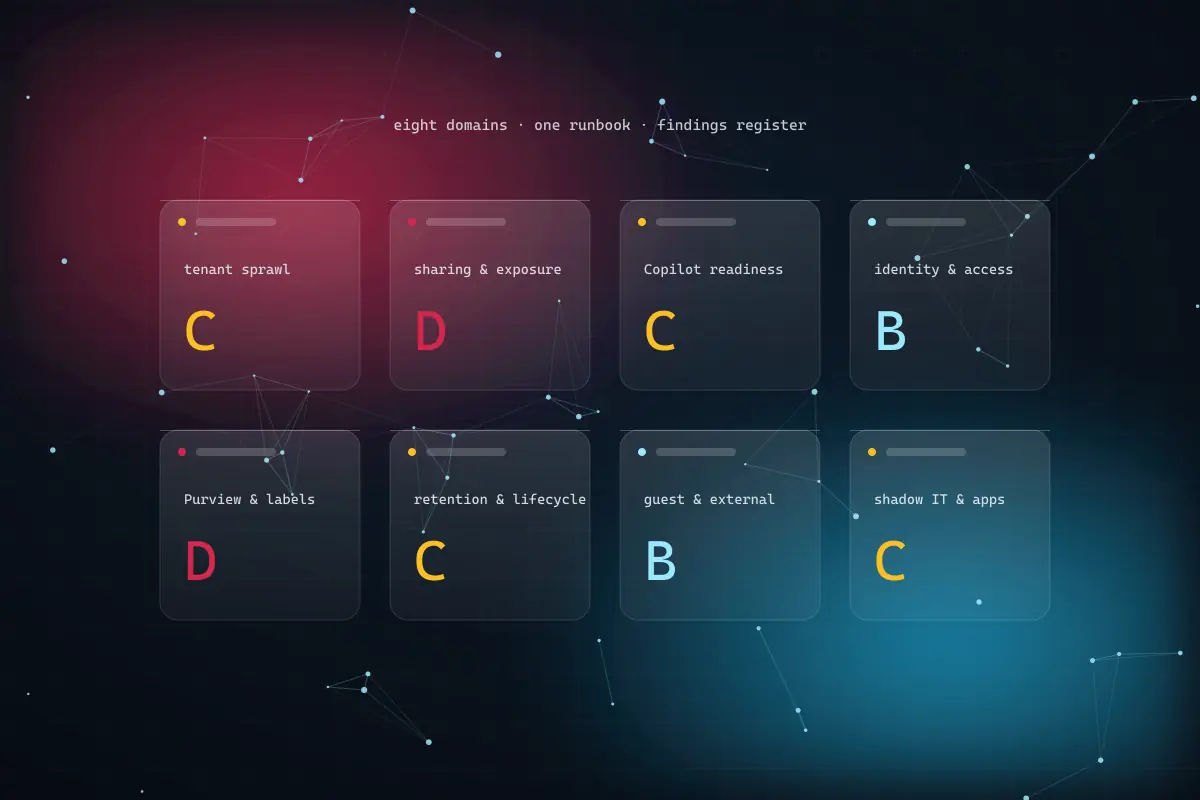
Eight governance domains, one remediation runbook.
Each domain produces findings with a severity, an owner and an effort estimate. Nothing arrives as “consider reviewing”.
- 01
Tenant Sprawl & Lifecycle Audit
Every site, Team, group and channel inventoried with owner, activity and last-modified date. Orphaned and duplicate workspaces identified for retirement, and retention policies and litigation holds checked against what actually happens when a workspace’s purpose ends. Usually nothing, which is the finding.
- Full workspace inventory with owner, activity and last-modified
- Ownership attestation, then archive or retire on a schedule
- Retention labels mapped to your records schedule
- 02
Sharing & Copilot Exposure Review
Organisation-wide links, anonymous links and content shared far more broadly than anyone intended, quantified rather than estimated. Then what Copilot would surface, to which roles, today, run with test accounts at different permission levels rather than inferred from settings.
- Org-wide and anonymous link enumeration with sensitivity cross-check
- Copilot exposure map by role, tested with real accounts
- Link expiry and scope defaults plus bulk remediation of existing links
- 03
Identity & Privileged Access Review
Conditional Access and MFA coverage, permanently assigned privileged roles, stale accounts and service principals holding permissions nobody remembers granting. Essential Eight evidences privileged access and MFA coverage here; SOC 2 evidences logical access.
- Conditional Access and MFA coverage measured, not assumed
- Just-in-time elevation with approval and time limits via PIM
- Stale account and service principal inventory with last sign-in
- 04
Purview & Sensitivity Label Baseline
Sensitivity label design against actual application, DLP policy coverage and effectiveness, and the gap between policy on paper and policy in force. We tell you which remediation needs E5 or the compliance add-on and which is achievable on E3.
- Label taxonomy review and applied-label coverage per site
- Default labelling, auto-labelling rules and targeted enablement
- DLP policy coverage with licensing requirement flagged per finding
- 05
Guest, External & Shadow IT Review
Every external identity with access, what they can reach, when they last used it and whether their engagement ended some time ago. Plus third-party apps with consented Graph permissions, ungoverned Power Platform environments and connectors moving data outside your controls.
- Guest inventory with reach and last activity; access reviews with automated expiry
- App consent policy, app review and revocation of unused grants
- Power Platform environment strategy and DLP connector policies
- 06
Remediation Runbook & Framework Mapping
A findings register with evidence, scope and severity; a runbook with ordered steps, PowerShell where it helps and hours per item; a quick-wins list; a target governance model; a one-page executive summary and a re-audit baseline. Findings mapped to the framework you are assessed against.
- Severity, named owner and effort estimate on every finding
- Mapped to ISO 27001, Essential Eight, SOC 2, Privacy Act, GDPR and UAE PDPL
- Repeatable measures so a six-month re-audit shows movement
What the audit finds, by vertical.
None of this means anyone was careless. It is what a decade of ordinary use produces when no one owns governance, and every finding has a measure attached.
01 · problem statement
Financial services
Sites with no owner dating back years, org-wide sharing links on sensitive files, and a Copilot rollout on the roadmap with a regulator and an ISO 27001 assessor both expecting evidence of access control, classification and retention.
02 · deployed architecture
Full eight-domain audit with Copilot exposure tested by role before enablement; sensitivity labels moved from published to applied with default and auto-labelling; ownership attestation and governed provisioning so sprawl becomes the exception; evidence mapped once to ISO 27001 and Privacy Act controls.
- Microsoft Purview
- SharePoint Online
- Microsoft 365 Copilot
- Entra ID Governance
- Graph PowerShell
03 · what we measure
- Org-wide links on sensitive files
- count remaining
- baselined at audit, re-measured after remediation
- Label coverage
- % of sensitive content labelled
- applied labels, not published labels
- Orphaned workspaces
- sites and Teams without an owner
- attested, archived or retired
We publish the measures we baseline and report against, not headline percentages. Results are measured in your tenant at audit, re-measured after remediation and at re-audit, and reported including the measures that did not move.
What ungoverned sprawl costs your IT team every year.
Your inputs, our arithmetic. Estimate the hours your team spends on access requests, sharing clean-up, guest chasing and evidence-gathering, then treat the result as a hypothesis the audit will baseline.
your estimate · per year
estimated value of hours returned, per year
- Hours returned per year
- 414
- FTE-equivalent capacity
- 0.2
Assumes 46 working weeks and 1,700 productive hours per FTE. Avoided incident, breach or assessment costs are not included because they cannot be honestly estimated before the audit. Microsoft licensing for E5 or compliance add-ons bills from Microsoft to your own tenant. This calculator publishes the arithmetic; it does not forecast your outcome.
Baseline this in the exposure reviewThree ways to work with us.
Fixed price per audit, scoped on seat count and tenant size. Remediation is optional, and plenty of clients run it themselves.
- Start here · free01
Exposure review
Forty-five minutes on a shared screen looking at your tenant settings. You leave with a read on sharing posture, guest access and Copilot exposure and the three fixes worth making this week. Nothing installed, nothing granted beyond what you choose to show.
- Commitment
- None
- Duration
- 45 minutes
- You receive
- Three named fixes
- Fixed-price project02
Full audit & runbook
Two to three weeks across all eight domains with read-only access. Findings register, runbook with hours per item, Copilot exposure map by role and an executive summary your board will read.
- Duration
- 2–3 weeks
- Access
- Read-only
- Priced
- On seats and tenant size
- Retainer03
Remediation, per month
We execute the runbook alongside your team, or advise while they do. Includes governance model rollout, provisioning and lifecycle policy, access review automation and a re-audit against the original baseline so the register shows movement.
- Term
- Monthly, optional
- Includes
- Governance model rollout + re-audit
- Suits
- No spare IT capacity
We do not publish rate cards, because a price without your seat count and tenant size behind it is guesswork someone eventually has to walk back. What we publish is the method: free exposure review first, fixed price for the audit second, optional monthly remediation third. Because the audit is priced on its own, we gain nothing by finding more than is there. Microsoft licensing is billed by Microsoft directly to your tenant and never resold through us.
What clients say after the governance audit.
Feedback from organisations who now have a governance model that holds, and the operating change that made the difference.
“The audit found sprawl we didn’t know existed — sites with no owner, dating back six years.”
Before & after: the findings deck nobody opened twice
- Audit output
- A runbook with owner, severity and hours per item
- no consultant needed to read it
- Workspace creation
- Requested through a form, attested, archived on schedule
- sprawl becomes the exception
- Copilot enablement
- Exposure mapped by role before the first seat
- tested with real accounts
- Compliance evidence
- Collected once, mapped to every framework
- assessor makes the formal determination
Illustrates the operating change on a typical mid-market tenant, not a client’s figures. Measured outcomes are reported against your own audit baseline.
Verification & alignment
- Microsoft Solutions Partner — Modern Workpartner
Designation earned on measured delivery performance and certified staff across Microsoft 365, Teams and SharePoint.
- Microsoft Solutions Partner — Data & AIpartner
Co-sell partner; eligible governance and Copilot readiness work may be part-funded through MCI and ECIF.
- ISO 27001 · Essential Eight · SOC 2compliance
Findings mapped to these frameworks as assessor-ready evidence. We evidence technical controls; we are not a certification body and do not issue attestations.
- Privacy Act / APPs · GDPR · UAE PDPLcompliance
Data handling, retention, cross-border disclosure and processor obligations evidenced from your tenant; your legal adviser owns the formal determination.
- Read-only audit, zero write accesspractice
Global Reader plus Security Reader, no agent installed, users notice nothing. Remediation is sequenced with you afterwards.
- A runbook, not a deckpractice
Every finding carries evidence, severity, a named owner and an effort estimate in hours, with repeatable measures for the re-audit.
Microsoft 365 governance audits, answered.
The questions we are asked in almost every first call, including the one about cost, answered as directly as they can be before we have seen your tenant.
The exposure review is free: forty-five minutes on your tenant settings with a consultant, ending with three named fixes. A full audit across all eight domains is a fixed price quoted after that review and scoped on seat count and tenant size, delivered in two to three weeks with read-only access. Remediation support afterwards is a separate monthly engagement and entirely optional. We deliberately price the audit as standalone so there is no incentive to inflate findings, and the runbook is written so your own team can execute it without us.
It establishes what Microsoft 365 Copilot would surface to which users before you enable it. Copilot inherits existing permissions, so oversharing that went unnoticed for years becomes discoverable through a natural-language question. We test with accounts at different permission levels and a scripted set of prompts per role rather than inferring from configuration, because the two often differ. The output is an exposure map by role that tells you which sharing and label findings need closing before the first seat is switched on, and which can wait.
Two to three weeks. We need read-level access to your tenant, and Global Reader plus a Security Reader role is usually sufficient, along with about two hours of your IT lead’s time across the engagement. We do not need write access at any point during the audit itself, we install no agent, and the audit runs against tenant configuration and reporting APIs so users notice nothing. Remediation is where change happens, and that is sequenced with you afterwards, starting with items that reduce risk without affecting anyone’s day.
Not for the audit itself. Some remediation, particularly auto-labelling and advanced DLP, requires Microsoft 365 E5 or the compliance add-on. Every finding in the runbook states which licensing it needs and which it does not, so you can decide with the numbers in front of you rather than buying licences on the assumption they are required. A surprising amount is achievable on E3: link scope and expiry defaults, guest access reviews, just-in-time privileged elevation, ownership attestation and app consent policy are all configuration changes rather than licence upgrades.
No. We evidence technical controls within Microsoft 365 and Azure and map findings to the relevant framework, whether that is ISO 27001, Essential Eight, SOC 2, the Privacy Act and APPs, GDPR or UAE PDPL. Collecting the tenant evidence once and mapping it usually removes a large share of the evidence-gathering effort for each assessment. We are not a certification body and do not issue attestations; your assessor or legal adviser makes the formal determination. What we give them is evidence they can rely on rather than a spreadsheet of assurances.
Annually for most organisations, or every six months if you are growing quickly, onboarding many guests, or have just enabled Copilot broadly. The first audit establishes a baseline with repeatable measures: label coverage, org-wide links remaining, guests past engagement end, permanent privileged assignments and findings resolved. A re-audit runs the same measures against the same register, so it is considerably cheaper than the first one and shows movement rather than starting again. Clients on the remediation retainer can have the same measures reported quarterly.
Reviewed 6 September 2026 by the Congnivex Systems Microsoft practice · Next review March 2027